Partner guide

Sell the work. The software is already free.

Elvoric charges nothing and takes no cut, so a partner earns from the service around the studio: the build, the launch, the retainer and the marketing. This page is the whole arrangement — what you earn, what you do, how to set one up, and what we will not let you promise.

Partner guide

What this is

Three facts. Everything below follows from them.

01

The studio is free

A client gets a storefront, a brief form, rendered concepts, a dashboard and an order link for nothing. No card, no checkout, no tier to upgrade to — and no software bill to pass on to your client.

02

We take no cut

Elvoric is not in the transaction. The order arrives in the client’s own WhatsApp, the money lands in their own account, and nothing of ours appears on their statement.

03

You are the business

You set your figure inside a published band, invoice the client in your own name, and get paid by them. We invoice nobody, ever.

Partner guide

What you actually do

Four services, in the order a client buys them. Each one is a band, so the client can see the ceiling before you quote.

Store build

10 – 50 USD

A live storefront: brand lifted from their Instagram, catalogue entered, palette and sections set, published with its own address.

One sitting. Their photos, their prices, their WhatsApp number. Paid once they have seen it live.

Domain and launch

30 – 80 USD

A domain in the client’s own name, pointed at the studio, both the bare address and www answering.

Registrar purchase in their name, records set by hand today, certificate checked. The registrar bills them at cost; your band buys the work.

Order-confirmation retainer

50 – 150 USD

Somebody answers the WhatsApp within the hour, confirms the transfer and passes the slip to the kitchen.

A shift, every day, on their number. This is the line that keeps a client for years.

Social and marketing

100 – 300 USD

Reels, post designs and menu assets that point at the ordering link.

A monthly set, made from what they already sell. Paid monthly, and the first line a client cuts in a slow month — quote it honestly.

Partner guide

How to set it up, screen by screen

Six steps from applying to the first order. The screenshots are the real product, captured from a running build — not drawings.

  1. 01

    Apply and get listed

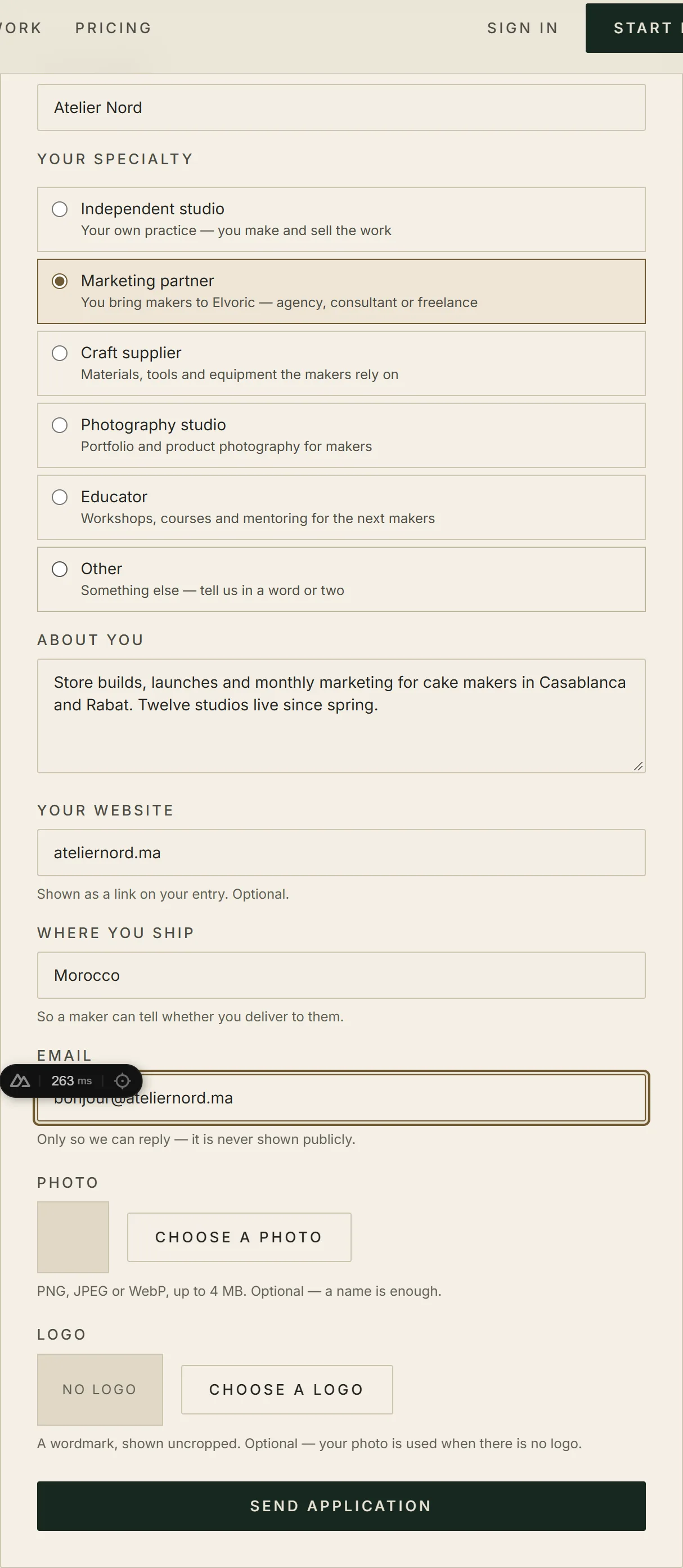
    Fill in the form on the partner directory: name, specialty, a short introduction, and a photo or a logo if you have one. Nothing is public until an operator has approved it.

    The application, filled in. Under 400 characters is all the introduction anyone needs.
    The application, filled in. Under 400 characters is all the introduction anyone needs.
  2. 02

    Read your listing back

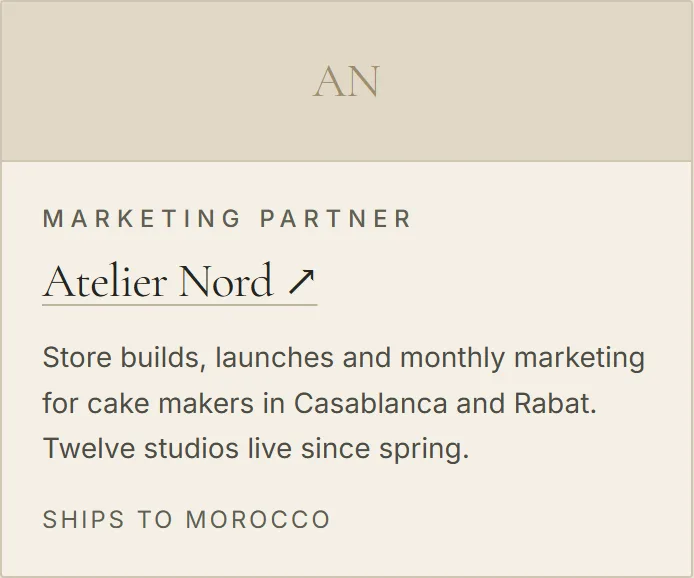
    Once approved you appear in the directory with a specialty line, your introduction and a link to your own site. This is the page a maker sees, so check the words before your client does.

    An approved entry. Without a photo the card shows initials rather than an empty frame.
    An approved entry. Without a photo the card shows initials rather than an empty frame.
  3. 03

    Copy your code and your link

    Approval mints an eight-character code and a link of the form /register?partner=CODE. Send the link to a client: the code rides along silently, and the account is counted to you once.

    Where it bites

    There is no partner login and no click count: the number is accounts, not visits, and it is reported on request.

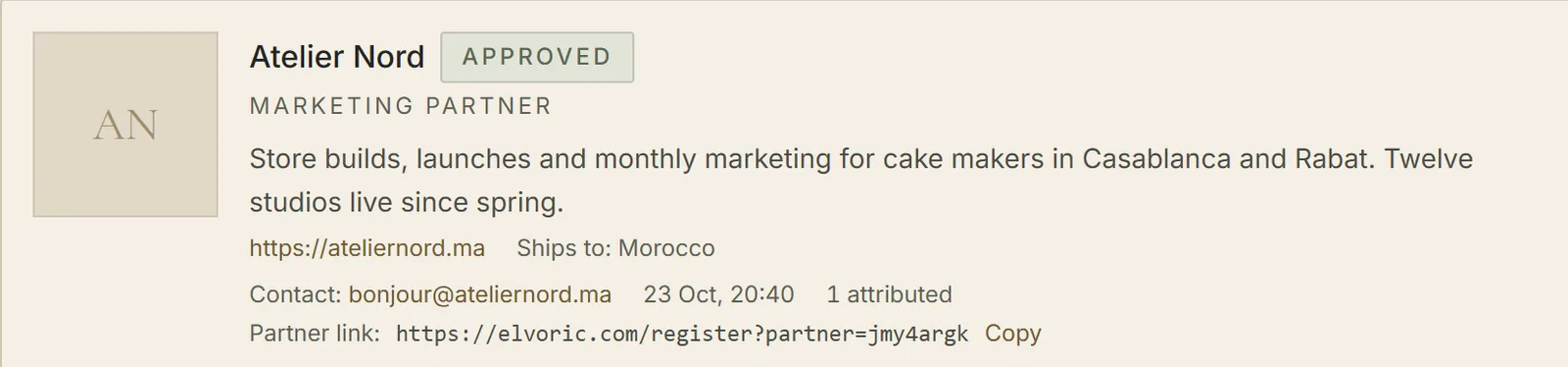
    Where the code and the link live today — an operator reads them off the partner screen and sends them to you.
    Where the code and the link live today — an operator reads them off the partner screen and sends them to you.
  4. 04

    Build the studio in the client’s account

    One account owns one studio, so the build happens in the client’s name — you drive while they watch, or they share their screen. Set the template, the palette and the words; the preview follows the palette as you choose it.

    Where it bites

    Logging in as your client is not built yet. Delegated access is the next piece of work, so until then the account stays theirs.

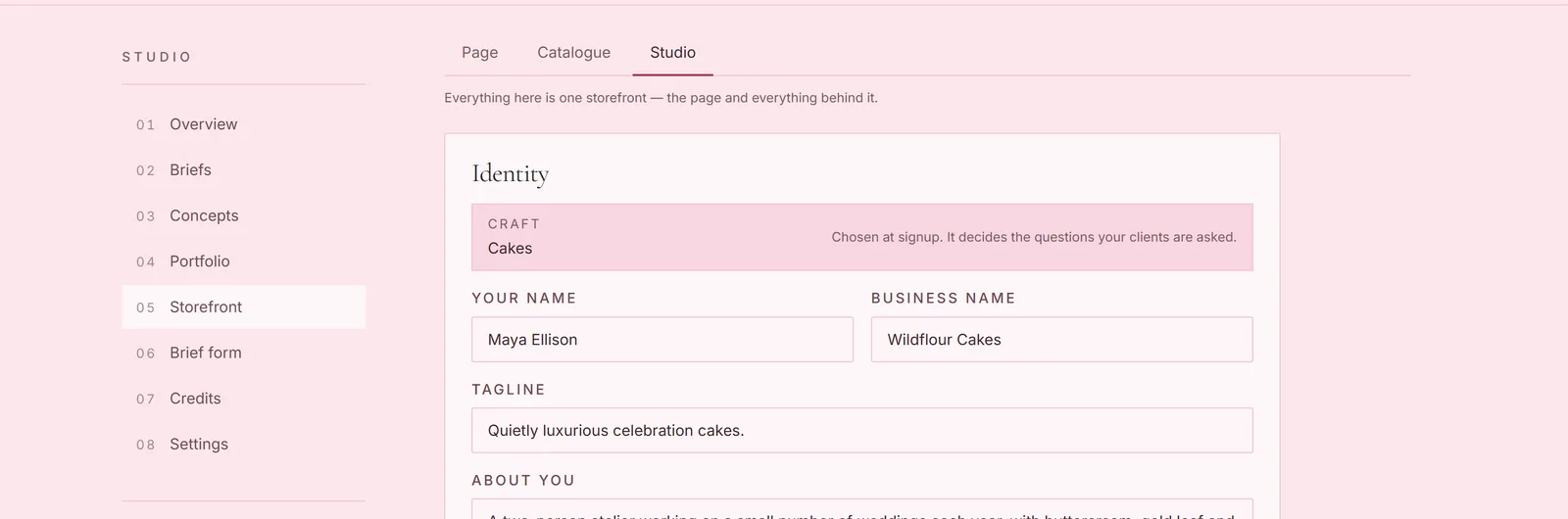
    The storefront editor: the Page tab arranges what a client scrolls, the Studio tab holds the name and the look, and the preview sits beside both.
    The storefront editor: the Page tab arranges what a client scrolls, the Studio tab holds the name and the look, and the preview sits beside both.
  5. 05

    Publish, and let the brief form work

    A published studio is a studio that can take a brief. The brief is where the occasion, the date, the servings and the budget arrive as a structured request instead of a voice note at midnight.

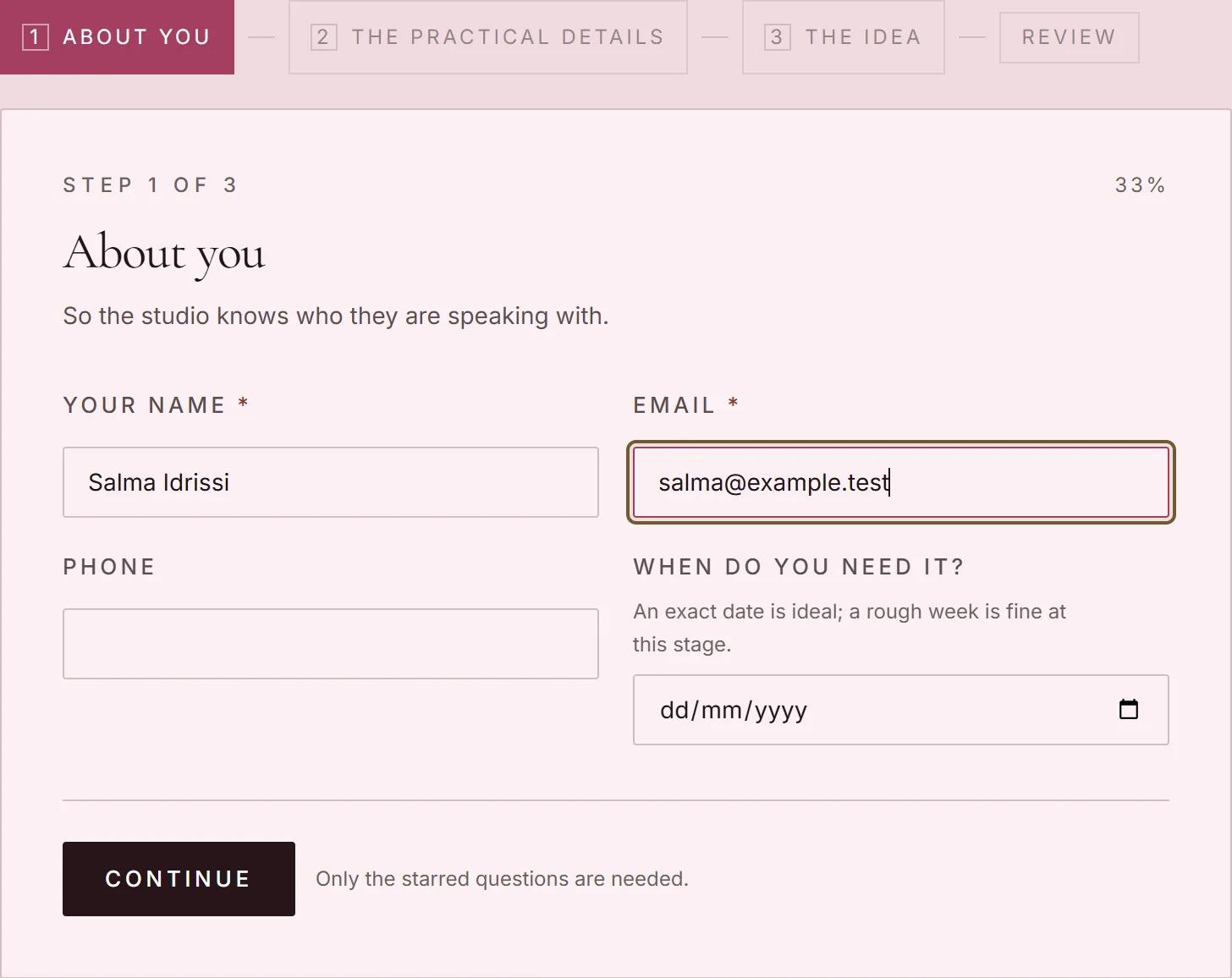
    The brief form, as the client fills it in.
    The brief form, as the client fills it in.
  6. 06

    Point the orders at their WhatsApp

    The order button opens a message to the client’s own number with the choice already written into it. Put the storefront link in their bio and their status: the order arrives as a message, and the money never leaves their bank.

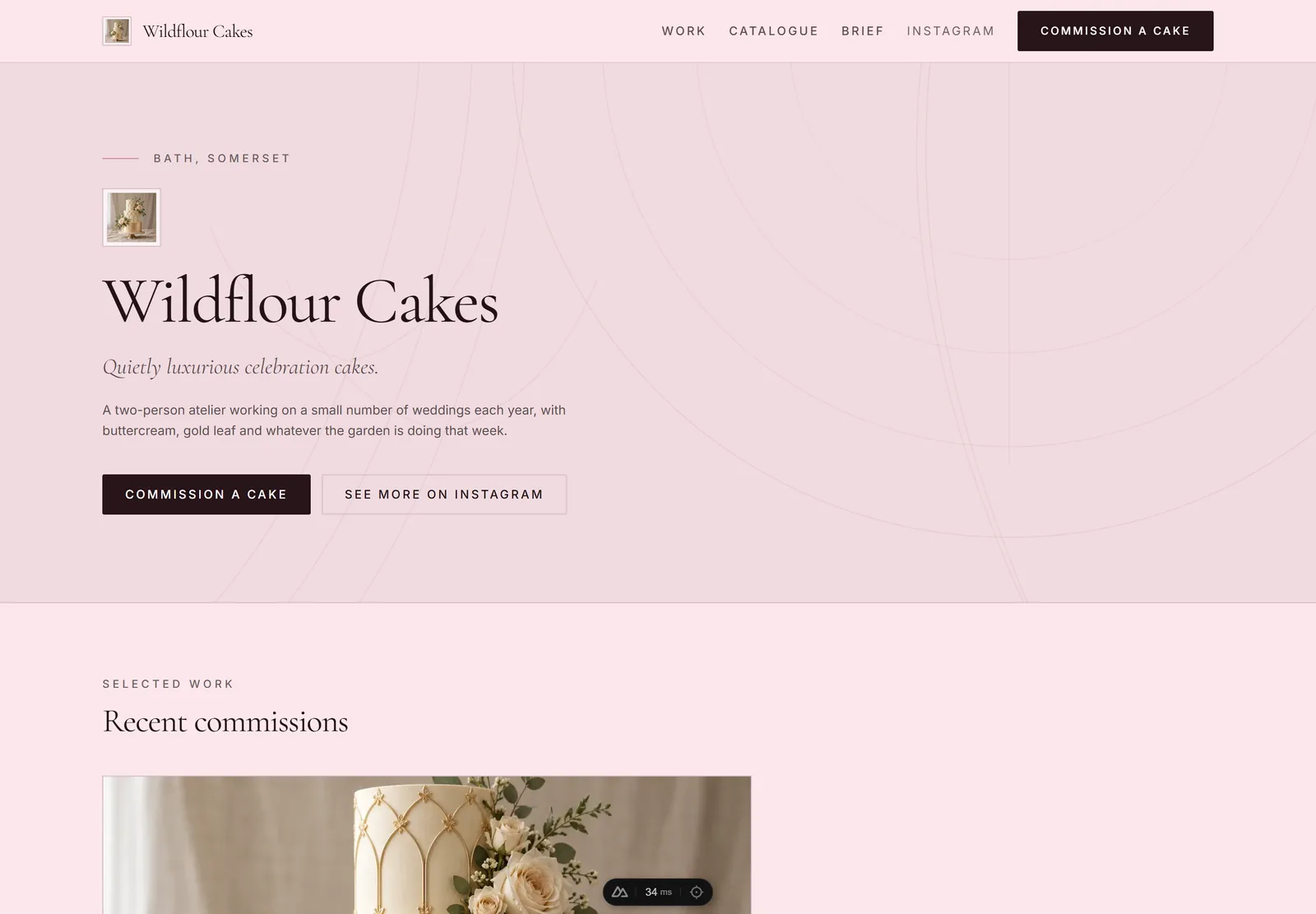
    A published storefront, and the order button that starts the conversation.
    A published storefront, and the order button that starts the conversation.

Partner guide

What a store can be, and what a client sees

Four states. This is the same table the product runs on, so nothing below is a promise the storefront cannot keep.

State

Draft

What a visitor gets

404noindex

A store being built. The design, the portfolio and the brief are all real; the address answers as if no store were there, so nothing is public and nothing is indexed.

Who moves it there

Nobody. Every store starts here, and no move returns it to here.

State

Published

What a visitor gets

200

Live. The address answers, the store is in the directory and the sitemap, the brief arrives, and search engines may index it.

Who moves it there

The owner. Publishing, taking it down and publishing again are their own moves.

State

Unpublished

What a visitor gets

404noindex

A store the owner took down. The design, the work and the briefs all survive; the public face is gone until they publish again.

Who moves it there

The owner. Publishing, taking it down and publishing again are their own moves.

State

Removed

What a visitor gets

410noindex

Moderation took the store down for cause, with a reason and a date. The record is kept, so nothing is lost — but the address says “gone” rather than “not found”, and search engines are told to drop it.

Who moves it there

Moderation alone, and no owner move leads into it.

Nothing leaves this state by an owner’s hand.

A removal is reversible. An administrator can restore the store, and a restore returns it to published rather than to draft, so a wrong call does not cost the client their history.

What this means for you: when a client’s store goes dark, find out which of the four it is before you promise a fix. Three of them the owner can undo from their own dashboard. A removed store they cannot, and publishing around a takedown is not a move the product offers.

Partner guide

What is not built yet

Every line here is something a partner could otherwise promise a client. None of it exists today, and each one has an owner.

  • A partner login. There is no portal yet — a listing, a code and a count, and the count is reported on request.

  • Signing in as your client. Delegated sessions are specified, not shipped, so the client drives their own account.

  • Self-serve custom domains. The domain band is real work you do by hand; no screen maps a client’s domain for you yet.

  • White-label. The studio carries Elvoric in its address, and there is no plan to remove it quietly.

  • Saved presets. Setting a palette once and applying it to every client is not built; each studio is set up in its own editor.

  • Leads and client lists. The directory is a listing read by makers who are already here, not a lead broker.

  • A partner’s own view of a removed store. Which of your clients is down, and why, needs the client directory at /partner — that is not built yet. The removal and its reason are recorded; no partner-facing screen shows them today.

What you may say

Four sentences that survive being repeated in a client’s kitchen, and one block of the things nobody here may say.

  1. 01

    A figure inside a published band. Below the floor undercuts every other partner; above the ceiling promises work nobody has priced.

  2. 02

    “Listed in the Elvoric partner directory” — and nothing more. Not official, not certified, not accredited.

  3. 03

    The studio is free. True, and checkable: there is no checkout in the product.

  4. 04

    No volume, no timeline and no client number you have not already signed yourself.

What we will not do

  • Take a percentage of a client’s sales — the transaction never reaches us.

  • Charge for placement, or sell a position in the directory.

  • Give one partner exclusivity over another; the same week, your competitor can be listed.

Questions partners ask

What do I pay Elvoric?
Nothing. There is no fee, no tier and no licence. If a client is ever billed by Elvoric, our central claim is false.
Do I get a share of my client’s orders?
No, and neither do we. The order is a WhatsApp message to your client and the money lands in their account. Nothing passes through the platform, so there is nothing to take a share of.
Can I charge more than the band?
No. Above the ceiling you are selling work nobody has priced and the client finds out at delivery. Inside the band the figure is yours, and you invoice it in your own name.
Whose name is the domain in?
The client’s, always. You buy it in their name and the registrar bills them at cost. A domain in your name is a hostage, and we will not help you take one.
Can I resell the software?
There is nothing to resell: the studio is free to anyone who signs up. What you sell is the build, the launch, the shift and the marketing — your time, priced inside the bands.
How do I get paid?
You invoice the client: bank transfer, cash, or your own processor. Elvoric is not a party to that invoice and appears nowhere on it.
How do I know my link worked?
Every account that arrives through your link is counted to you once, and the count is reported on request. There is no click count, because there is no cookie.
Do I get leads, or client details?
No. The directory is read by makers who are already here; it is a listing, not a lead broker. We do not hand over identities, briefs or account data.
Start with the directory

Apply, get approved and take the code. The first client is the hard one; after that the build is a single sitting and the retainer pays every month.

Free core, no cut, bands published. If any of it stops being true, this page changes with it — the price table and the terms are the documents of record.